
MEPCO Name Change Online 2026
When you buy a house or inherit property in South Punjab, the electricity meter does not transfer to your name automatically. Keeping the old name on your bill can cause problems with solar net-metering, property sales, and bank verification. This guide shows you the easiest way to complete your MEPCO Name Change online or at the office without facing rejections.
Why Updating Connection Ownership Records Is Necessary
The consumer name printed on a MEPCO electricity bill is an official record maintained in the central billing database. Neglecting a MEPCO Name Change process can stall critical paperwork:
- Legal Address Verification: Banks, passport offices, courts, and visa centers require utility bills issued under the applicant’s exact legal name as proof of address.
- Solar Net-Metering Approval: NEPRA and MEPCO regulations mandate that solar net-metering licenses and green meter agreements match the legal property titleholder’s name exactly.
- Avoiding Inheritance Disputes: Completing a MEPCO Name Change after a family member’s death prevents disputes among legal heirs over property control and utility management.
- Billing Adjustments & Refunds: Claims regarding faulty meters, billing overcharges, or security deposit refunds are only processed for the registered titleholder.
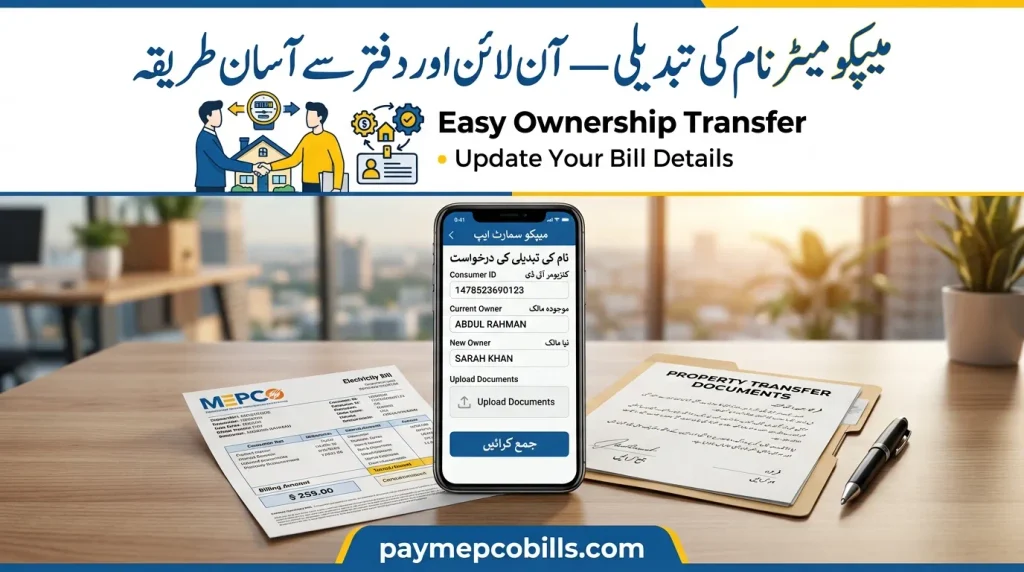
Essential Documents Required for MEPCO Name Change
Required documentation depends directly on how the property was acquired. Missing or unverified documents account for most application delays during a MEPCO Name Change at local sub-division offices.
Case 1: Property Purchase (Registered Sale Deed / Fard)
- Attested copy of the applicant’s valid CNIC.
- Copy of the latest paid MEPCO electricity bill.
- Proof of ownership: Registered Sale Deed (Registry) or Fard-e-Malkiyat showing property mutation (Intiqal).
- Copy of the seller’s / previous owner’s CNIC (optional, but accelerates verification).
- Certified Wiring Test Report issued by an authorized electrical contractor.
Case 2: Inherited Property
- Attested copy of the applicant’s CNIC and copy of the deceased owner’s CNIC.
- Official Death Certificate issued by NADRA or the local Union Council.
- Succession Certificate or updated inheritance mutation (Warasati Intiqal) in the Fard.
- Signed No Objection Certificate (NOC) or affidavit on Rs. 100 stamp paper from all other legal heirs consenting to the MEPCO Name Change.
- Copy of the latest paid electricity bill.
Case 3: Gift Deed or Court Order
- Attested copy of the applicant’s CNIC.
- Registered Gift Deed (Hiba Nama) or certified Court Transfer Order.
- Copy of the latest paid electricity bill.
- Undertaking affidavit affirming that all submitted documents are genuine.
How to Apply for MEPCO Name Change
Consumers can choose between digital registration via mobile app/web portals or physical submission at their local sub-division office.
Method 1: Applying via MEPCO Smart Mobile App
- Download & Log In: Download the official MEPCO Smart App from Google Play Store or Apple App Store and sign in.
- Select Attribute Change: Navigate to the Services section at the bottom menu and choose Request for Change of Attributes.
- Choose Name Change: Select Owner Name Change from the option list (this section also manages load extensions and tariff updates).
- Enter Details: Enter your 14-digit Reference Number along with your personal details matching your CNIC for your MEPCO Name Change.
- Upload Documents: Upload clear JPG or PDF scans of your CNIC, ownership proof, paid bill, and wiring report (file size must be under 300 KB).
- Save Tracking ID: Submit the request and note down the tracking number to monitor your file status digitally.
Read More About MEPCO Load Shedding Schedule 2026
Method 2: Applying Online via ENC Web Portal
- Access the Portal: Open your browser and navigate to the official Electricity New Connection (ENC) portal.
- Select Change Option: Click on Change located on the left menu bar.
- Enter Account Info: Select MEPCO Name Change under application type, choose MEPCO as your distribution company, and select your specific Sub-Division.
- Fill Application Details: Input your 14-digit Reference Number, existing owner details, and new applicant information.
- Attach Required Files: Upload scanned copies of your CNIC, proof of ownership, latest bill, and wiring test report (JPG/PDF format, max 300 KB).
- Submit & Print: Submit the online application, save the generated tracking number, and print out the completed application form for physical verification if requested by your sub-division office.
Method 3: In-Person Sub-Division Office Submission
- Visit Assigned Office: Locate your local MEPCO Sub-Division Office or Customer Facilitation Centre. (Call 118 if you are uncertain which office covers your area).
- Get Application Form: Collect the Change of Connection Attributes / Name Change Form from the consumer desk.
- Submit Paperwork: Fill out the form completely, attach all attested document copies, and hand over the file to the Revenue/Commercial Officer for your MEPCO Name Change.
- Field Verification: The office verifies ownership documents against land records and dispatches field inspectors if a physical meter site check is required.
Read More About MEPCO Duplicate Bill Online: View, Download & Print Guide (2026)
Fees & MEPCO Demand Notice Explained
A MEPCO Name Change involves administrative charges and security deposit adjustments:
- Demand Notice Generation: Once document verification passes, MEPCO issues an official Demand Notice detailing processing charges for the MEPCO Name Change.
- Security Deposit Adjustment: If the old security deposit on the meter is lower than current NEPRA-approved rates, the Demand Notice includes a differential top-up fee.
- Payment: Pay the exact Demand Notice amount at designated commercial banks, post offices, or mobile banking applications.
- Verification: Submit or upload the paid Demand Notice slip back to MEPCO to finalize billing system updates.
Related Connection Updates (Tariff & Load Changes)
When submitting a request for attribute changes alongside a MEPCO Name Change, consumers can combine multiple updates in a single file:
- Change of Tariff: Required when converting property usage from domestic to commercial, or setting up solar net-metering connections.
- Sanctioned Load Extension: If adding high-power appliances (air conditioners, motors, commercial machinery), request a load extension to prevent line tripping and overloading penalties. (Note: Most sub-division offices maintain a minimum 3 kW load requirement for standard residential connections).
- Meter Relocation Within Same Sub-Division: If moving within the same sub-division jurisdiction, submit a meter relocation request at the sub-division office. After fee payment and site inspection, field staff relocate the physical connection.
Common Mistakes That Delay Approval
- Unattested Document Copies: Submitting un-attested CNIC or property document copies leads to immediate file rejection during a MEPCO Name Change.
- Unpaid Dues & Arrears: Pending monthly bills, detection surcharges, or installment arrears halt application processing until fully cleared.
- Unregistered Sale Agreements: Submitting an informal sales receipt or un-registered agreement (Bayan-ul-Mabi) instead of a registered Sale Deed (Registry) or Fard causes rejection.
- Missing Heir NOCs: Failing to attach signed consent affidavits from all legal heirs in inheritance cases delays file processing for a MEPCO Name Change.




2 Comments